Every Minecraft world lives in its own folder on your device. You need that folder to install a downloaded map, back up a world before a big update, or move a world to another computer. Here is where it is on each platform. The sections below show how to get there when the folder is hidden, which it is on most systems.
| Platform | Worlds folder |
|---|---|
| Java Edition, Windows | %appdata%\.minecraft\saves |
| Java Edition, macOS | ~/Library/Application Support/minecraft/saves |
| Java Edition, Linux | ~/.minecraft/saves |
| Bedrock, Windows (version 1.21.120 and later) | %appdata%\ |
| Bedrock, Windows (older versions) | %localappdata%\ |
| Bedrock on phones and consoles | Inside the app's own storage. Use Export World and .mcworld files instead (see below). |
The fastest way: open it from inside Minecraft
Java Edition can open the folder for you, which skips every hidden-folder problem on every operating system:
- Start Minecraft and click Singleplayer.
- Select any world in the list and click Edit.
- Click Open World Folder. Your file manager opens that world's folder.
- Go up one level. The folder you land in is
saves, and every world you have is in there.
If you have no worlds yet, create a quick throwaway world first, or use the typed paths below. There is a similar shortcut for the main game folder: Options > Resource Packs > Open Pack Folder opens resourcepacks, which sits right next to saves inside .minecraft.
Windows (Java Edition)
- Press
Win + Rto open the Run box. - Type
%appdata%\.minecraft\savesand press Enter.
%appdata% is a shortcut that Windows expands to your own user folder, so the same text works on every PC. It points to C:\Users\YourName\AppData\Roaming. File Explorer hides the AppData folder by default, which is why people click through C:\Users\YourName and never find it. Typing the path works even while the folder is hidden.
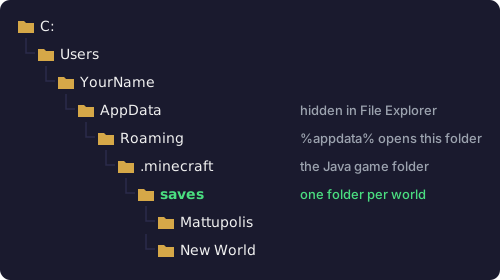
%appdata%\.minecraft\saves. AppData is the hidden step; everything after it is visible once you are inside.If you would rather see hidden folders all the time, open File Explorer, choose View > Show > Hidden items on Windows 11 (on Windows 10 it is a Hidden items checkbox on the View tab).
macOS
- Open Finder.
- Press
Cmd + Shift + G(or choose Go > Go to Folder from the menu bar). - Paste
~/Library/Application Support/minecraft/savesand press Return.
Two details trip Mac players up. First, the folder is called minecraft with no leading dot, unlike Windows and Linux. Second, your user Library folder is hidden. Holding the Option key while the Go menu is open makes Library appear in the list if you want to browse there by hand.
Linux
The official launcher keeps everything in ~/.minecraft, so worlds are in ~/.minecraft/saves. The leading dot makes the folder hidden. Press Ctrl + H in most file managers to show hidden folders, or type the path into the location bar. From a terminal, cd ~/.minecraft/saves gets you there directly.
Custom game directories and other launchers
The paths above are defaults. If a map you copied into saves never appears in the game, the most likely reason is that the game is reading a different folder.
- Official launcher with a custom game directory. Each installation can have its own folder. In the Minecraft Launcher, open the Installations tab, click the three dots next to the installation you play, and choose Edit. If the Game directory field shows a path, that installation keeps its worlds in a
savesfolder inside that path. - CurseForge, Modrinth App, Prism Launcher and similar. Modded launchers give every profile or instance its own game folder so that mods and worlds don't mix. Use the launcher's option to open the profile folder, then look for
savesinside it. A world copied into the default.minecraft\saveswill not show up in a modded profile.
The in-game Open World Folder button from the first section always opens the folder that the running copy of the game is actually using, so it is the quickest way to settle any doubt.
What is inside a world folder
Knowing what a healthy world folder looks like makes it easy to spot a broken map download. This is the layout most downloadable maps use:
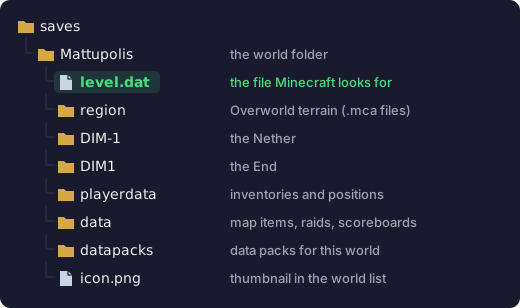
level.dat: Minecraft lists a folder as a world when that file sits directly inside it.level.datholds the world's basic information, such as its name and the game version it was last saved in.regionholds the terrain of the Overworld in.mcafiles, each covering a 32 by 32 chunk area.DIM-1andDIM1hold the Nether and the End the same way.playerdatastores each player's inventory, position and health, one file per player.datapacksis where data packs for that one world go.icon.pngis the little picture next to the world in your list. Deleting it is harmless.
Worlds saved in Java Edition 26.1 or later use a tidier layout: the dimensions move into a dimensions folder and player files into a players folder. Either way level.dat stays at the top, so the check is the same. If you open a map folder and the first thing you see is another folder instead of level.dat, the map is nested one level too deep. Our map not showing up guide shows how to fix that and the other common install problems.
Bedrock Edition on Windows
Bedrock changed its folder in version 1.21.120, released on October 28, 2025. That update moved Minecraft for Windows onto Microsoft's newer game platform (the GDK) and migrated every existing world on first launch. Worlds now live here:
%appdata%\Minecraft Bedrock\Users\<number>\games\com.mojang\minecraftWorldsThe <number> folder belongs to the Microsoft account you play with. If you see more than one numbered folder, each is a different account; open the one with the most recent dates. Resource packs and behavior packs shared by all accounts go in %appdata%\Minecraft Bedrock\Users\Shared\games\com.mojang instead.
Guides written before late 2025 point to the old location under %localappdata%\Packages\Microsoft.MinecraftUWP_8wekyb3d8bbwe. If your game is up to date, that folder is no longer the one Minecraft reads, so copying a world there does nothing.
Bedrock world folders have random names. Instead of "My Survival World" you will see something like kT3xAAAAAA=. Open the levelname.txt file inside each one to see which world it is.
Phones, tablets and consoles
On Android and iPhone the worlds sit inside the Minecraft app's private storage, and on Xbox, PlayStation and Switch there is no file access at all. You almost never need the folder on these devices. To move a world off a device, open the world's settings (the pencil icon next to it in your worlds list) and use Export World, near the bottom of the settings. It saves the whole world as a single .mcworld file. To add a downloaded map, open its .mcworld file with Minecraft. Our Bedrock install guide covers each device.
Back up a world before you touch it
Before moving files around, updating to a new version, or adding mods to an existing world, make a copy. Java Edition has a built-in button for it: Singleplayer > select the world > Edit > Make Backup. Minecraft zips the whole world into the .minecraft\backups folder, named with the date, the time and the world folder's name. To restore it, unzip that file into saves.
On Bedrock, Export World (described above) doubles as a backup, since the .mcworld file contains the whole world. On Windows you can also copy the world's folder out of minecraftWorlds to somewhere safe.
Questions
- Why can't I see the AppData or Library folder?
- Both are hidden by default. Type the path into the Run box (Windows) or Go to Folder (Mac) as shown above, or use the in-game Open World Folder button.
- Does renaming a world in the game rename its folder?
- No. The name you edit in the game is only the display name stored in
level.dat. The folder keeps its original name. - If I delete a world in Minecraft, does it go to the Recycle Bin?
- No. Java Edition deletes the folder outright and warns that the world will be lost forever. Make a backup first if there is any chance you will want it back.
- Can I copy a world to another computer?
- Yes. Copy the whole world folder (Java) into the other computer's
savesfolder, or move the exported.mcworldfile (Bedrock) and open it there. Java and Bedrock worlds are different formats, so a world only works in the edition it came from unless you convert it. - Where do screenshots go?
- Java Edition saves screenshots taken with F2 to the
screenshotsfolder inside.minecraft, next tosaves.
Next steps
Now that you know where the folder is, the Java map install guide walks through adding a downloaded map from start to finish, and the maps library has worlds worth trying.