For a vanilla Java server with a handful of friends, 2 GB is enough. The Minecraft Wiki's server tutorial puts it plainly: 2 GB is "more than enough for a home server with 5 players" at the default distance settings, and larger servers may need 4 GB. Plugins, modpacks, more players and a longer view distance all push that number up. Use the table for a rough answer, or the calculator below for your exact setup.
| Server | Players online | RAM to start with |
|---|---|---|
| Vanilla or Paper | 1 to 5 | 2 GB |
| Vanilla or Paper | 6 to 15 | 3 to 4 GB |
| Paper with plugins | 15 to 30 | 4 to 6 GB |
| Small modpack (under 100 mods) | 1 to 5 | 4 GB |
| Large modpack (100 to 250 mods) | 1 to 5 | 6 to 8 GB |
| Huge modpack (250 mods or more) | 1 to 5 | 8 to 10 GB |
These are our rules of thumb for Java Edition, not official requirements. Many modpacks state their own recommended RAM on their download page; when they do, use the higher of the two numbers.
RAM calculator
Recommended memory
2 GB
1 GB for the server itself, plus about 0.6 GB for 5 players at view distance 10.
Renting a server? Choose a plan with at least 2 GB.
Hosting it yourself? Start the server with:
java -Xms1G -Xmx2G -jar server.jar --noguiThe calculator rounds up to whole gigabytes and never suggests less than 2 GB, the practical minimum for a Java server. It is an estimate to start from. Check real usage once people are playing (see how to check below) and adjust.
How the calculator works
A Minecraft server's memory goes to two things: a fixed cost for the server software and everything it has loaded (mods and plugins included), and a cost that grows with the part of the world players keep loaded. The calculator adds the two:
- Base memory by server type: 1 GB for vanilla or Paper, 1.5 GB with plugins, and 3, 5 or 7 GB for small, large and huge modpacks. Mods add blocks, items, machines and code that stay in memory whether anyone is online or not.
- Memory per player: about 0.05 GB for the player, plus up to 0.1 GB for the chunks around them at the default view distance of 10. Modded chunks cost half again as much, since modded worlds hold more machines and block data.
- View distance: the chunk cost scales with the number of chunks each player keeps loaded, shown in the chart below.
- Playing together: players standing near each other share chunks, so the chunk cost is halved for groups that mostly play together.
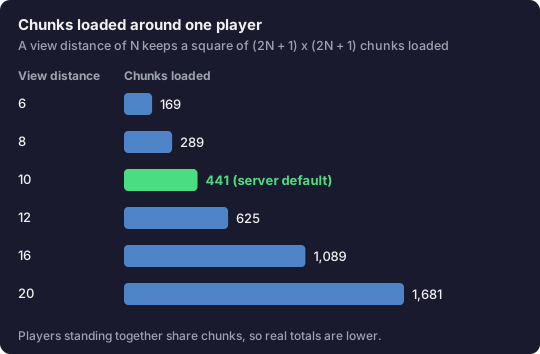
This is why view distance matters more than most people expect. Five players spread across the map at the default distance of 10 can have up to 2,205 chunks around them, the same figure the Minecraft Wiki uses for its 2 GB example. At view distance 16, the same five players can have up to 5,445. If memory is tight, lowering view-distance in server.properties is the cheapest fix there is.
When more RAM won't fix lag
Running out of memory and lagging are different problems. A server that is short on memory stutters at regular intervals while Java clears out unused memory, and eventually crashes with an OutOfMemoryError in the log. A server with plenty of memory can still lag if the CPU can't keep up.
Minecraft aims for 20 ticks per second, and most of the work for each tick runs on a single CPU core. Big mob farms, piles of dropped items, lots of redstone, and many players exploring new terrain at once all add CPU work, not just memory use. When ticks per second drop while memory use looks normal, extra RAM does nothing. What helps is a faster CPU, a lower simulation-distance (which controls how far from players the world keeps running), fewer entities, and performance-focused server software like Paper.
Giving a server far more memory than it needs doesn't help either. Java lets unused objects pile up until it runs a cleanup, and a huge memory allowance can mean fewer but longer cleanup pauses. Start from the calculator's number and only add more when you see memory actually running out.
How to check how much memory your server really uses
- spark. The free spark profiler shows memory, CPU and ticks per second with
/spark health. Recent Paper versions include it; on other servers it installs as a plugin or mod. - Your host's panel. Most hosting control panels graph memory use over time. Look at busy evenings, not an empty server.
- Not Task Manager. Java reserves memory up to the limit you set and is slow to hand it back, so Task Manager shows how much Java has claimed, not how much the world needs.
- Not the F3 screen. F3 shows your own game's memory, not the server's.
Setting the memory when you host it yourself
The server's memory limit is set when you start it. The Minecraft Wiki's tutorial uses this command:
java -Xms1024M -Xmx2048M -jar server.jar --nogui-Xmx is the maximum the server may use, which is the number the calculator gives you. -Xms is the amount it starts with, and only affects startup. You can write the values in megabytes (2048M) or gigabytes (2G). Modern Forge and NeoForge servers start through a script instead; put the -Xmx value in the user_jvm_args.txt file they create.
Leave memory for everything else on the computer. Windows itself needs a few gigabytes, and if you also play on the same PC, the game takes several more. On a 16 GB machine running both the game and a modded server, 6 to 8 GB for the server is a sensible ceiling. Our server setup guide walks through the rest of a self-hosted install, including the eula.txt step and port forwarding.
Picking a hosting plan
Hosts sell plans by RAM, so the calculator's result maps straight to a plan size. A few things to keep in mind:
- Buy for your busiest night, not an average one.
- For modpacks, check the pack's own recommendation as well as the calculator, and pick the larger number.
- CPU matters as much as RAM for lag (see above). A cheap plan with lots of RAM on a slow, crowded machine still lags.
- Most hosts let you upgrade a plan later, so starting smaller and moving up is cheaper than guessing high.
BisectHosting: our pick
Plans are sold by RAM, with one-click installs for Paper, Fabric, Forge and most popular modpacks, automatic backups, and upgrades when you need more memory.
See server plansQuestions
- Is 1 GB enough for a Minecraft server?
- A vanilla server with one or two players and a short view distance can start on 1 GB, but it has no headroom and will struggle the moment anyone explores. Treat 2 GB as the minimum for Java.
- Does a Bedrock server need as much RAM?
- Usually less. Bedrock Dedicated Server is native software rather than Java, and it tends to need less memory for the same number of players. The calculator is built for Java servers, so its numbers are on the generous side for Bedrock.
- Will more server RAM give players more FPS?
- No. Frame rate depends on each player's own computer and settings. Server memory affects whether the world keeps up (smooth mob movement, blocks breaking instantly), not how many frames a player sees.
- How much RAM for a server with Geyser, so Bedrock players can join?
- Geyser runs on a Java server as a plugin or mod, so size the server as Java with plugins. Geyser does extra work for every Bedrock player it translates for, so leave a little headroom if many of your players are on Bedrock.